Note that if you actively don’t want the plant to be scannable or have any reactive animation, you can just place the plant as a static mesh (or foliage)! Otherwise, follow the steps below:
- Add collision to the static mesh. Larger placeable plants likely will have reasonable player collision, but even if they don’t we need collision for the scan system. Try to keep it relatively simple - the auto tool sometimes gives great results but don’t underestimate the power of capsules.
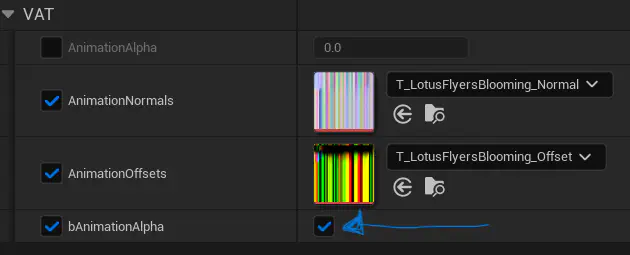
Make sure bAnimationAlpha is turned on in the material!
- Add a new blueprint class to the folder
- For the parent class, search “heroplant” and select “BP_HeroPlant_Base”
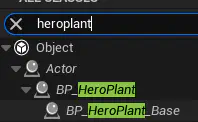
Anything that is scannable is a hero plant! We can technically add a scan component to anything but this is generally the easiest way.
- For the parent class, search “heroplant” and select “BP_HeroPlant_Base”
- Name this asset “BP_PlantName”
- Open the asset, select the “StaticMesh” component in the Components panel on the left
- On the details panel on the right, set the “Static Mesh” variable to the mesh you imported

- On the details panel on the right, set the “Static Mesh” variable to the mesh you imported
- Now click on the “ScanComponent” component in the components panel.
- In the details panel, set the “Tag” variable. This is the scan tag for the plant, usually just “PlantName”. These must be unique per scan (variants excluded
- If this is a variant (same species / scan, different type), set the “Varient” integer. I think we are supporting up to 4
- Yes, I misspelled variant “Varient”. Deal with it lol
You done! Now you can drag in the BP and it should be scannable.
- Refer to the “Scan Data Entry” documentation for actually entering in the scan data for your new lil guy
- Any specific code will live in the BP
- Any related plants / variants can and probably should be children of your newly created BP - you can right click it and click “create child blueprint class” then change the variables (mesh, scan variant int) on the new child
What if you placed some static mesh versions of the plant and you want to replace them with your new BP? IE Upgrading from static mesh
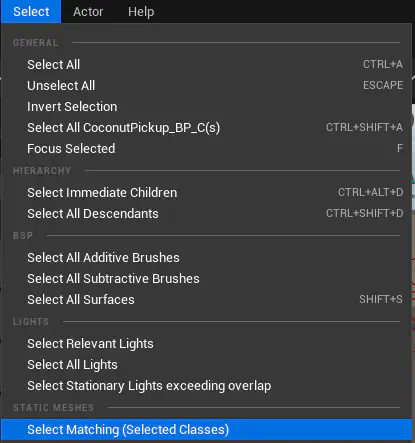
- EZ. First, select all existing static meshes in your world. You can automate this by selecting one, then clicking on “Select” up at the very top menu bar:
- Once you have your meshes selected, in the content browser select the bp you want to replace them with.
- Right click on one of the selected meshes in the viewport and choose “Replace Selected actors with”
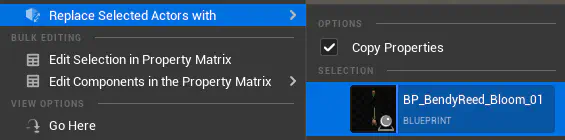
- You may need to update any materials if you manually changed them in the instances, otherwise, you are good to go!