Hand Tool Lives at
ArtSource > CoreMechanics > HandTool > HandTool.blend
A version of the boned player model also lives in the file, player arm location is currently “”off”” and incorrect compared to in game stuff. To be tweaked next time.
When updating the Player Model Posing - the skeleton will need to be moved to origin. (Currently file is set up so that the hand tool is at origin. )
Currently using “SM_HandToolTest” to update the player model in game.
Exporting from blender:
Select the Tool and the armature
File > Export > glTF/glb
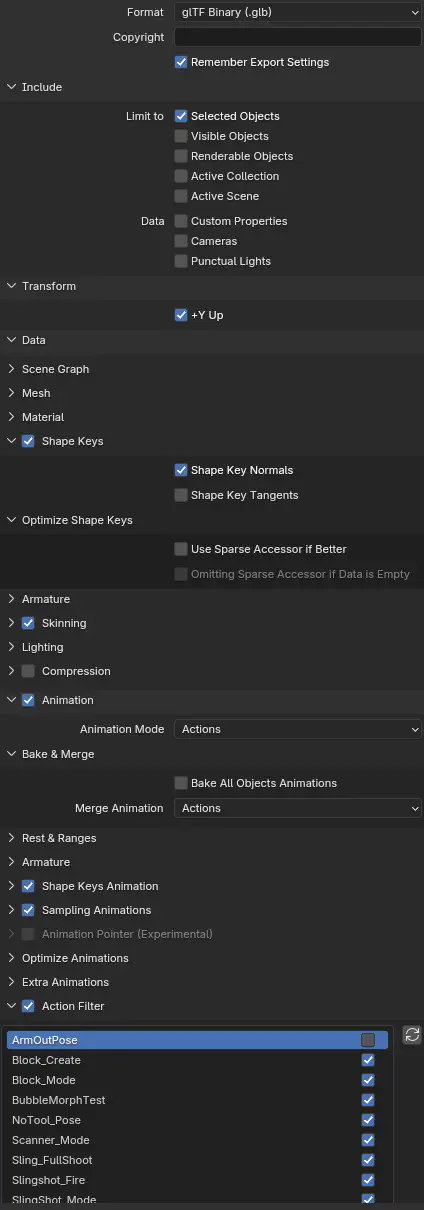
- The image is the current settings.
- However there has been an issue where sometimes SOME of the shape keys just…. Don’t get read properly by unreal. If that’s the case, pray and play with settings. It probably won’t help though. Other people talk about it [here]
- I manually added the curves needed to the 1 anim that was missing in unreal (problem anim is Block_Create)
- Action Filter is very nice because you can turn off test anims to save on clutter.
Unreal:
Lunos > Player > ToolHand > Skeletal
Import into [Skeletal folder]
This will create the materials and skeletalmeshes folders.
Inside the SkeletalMeshes folder is where everything is that needs to be double-checked.
Posing:
Art Source > Player > Rig > PlayerRig.blend