There are five “locations” rewards can be:
- Chests
- Scan Sets
- Bot Quest Complete
- Skill Tree
- Ship Shop
(Default) Location - Chest
- Give the treasure chest a location tag
- This is flipped when the player actually grabs the contents of the chest
- With the chest selected, in the Rewards Widget, enter a reward tag under “Manual Check Struct”
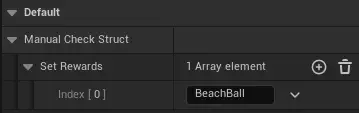
- The chest text should turn blue and display the location name and reward name
- You may need to refresh the chest for these to show up
(Default) Location - Scan Set
- In the Scan Data Entry widget for the object, set the “Set Rewards” to the desired reward tag
- You’ll need to refresh the reward database if you do this - in the reward table widget, click the refresh button
(Default) Location - Bot Quest
- In the bot RQ, se the “default rewards” to the desired reward tag
- You’ll need to refresh the reward database if you do this - in the reward table widget, click the refresh button
(Default) Location - Skill tree / Research Node
- These are automatically grabbed from “DT_ResearchNodeChecks”
- You’ll need to refresh the reward database if you do this - in the reward table widget, click the refresh button
(Default) Location - Ship Shop
- Props, skins, music ETC are automatically “reciped” and sent to the shop. We may want to have purchasable items - this is handled differently.
- TO DO! IT all works but I have a feeling we are going to change how scan bits are spent, if at all. We may just make them “score”
RECIPES ARE DEPRECATED! Scanning / picking up items add that item to the printable list directly
- This is accomplished via scan “set” rewards, listed in the scan data entry. See beachball for an example
- Essentially you need to make a reward tag in the database (MAKE AN EDITOR FOR THIS) then set the set reward to this tag