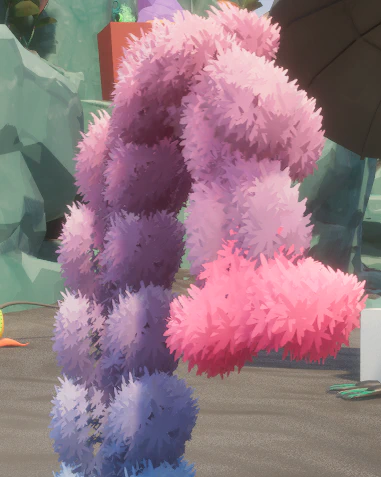
Blender
- Fuzzy sections must be quads. Evenly spaced generally works best
- The size of these quads greatly affects the final result!
- Zbrsuh quad remesh works great for this
- Tris just kinda get eaten
- Make a material separation for where you want the fuzzy to be
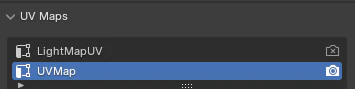
- Duplicate your UV and set it active (camera button)
- Name does not matter as long as it is the second in the list
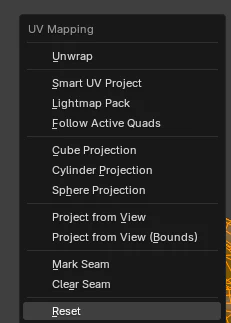
- In edit mode, select all the quads, hit U -> Reset
- This sets all the quads to individual square UVs - exactly what the material needs
- Export from blender
UE
After importing, make sure the mesh does NOT generate lightmap UVs (this overrides UV1!)
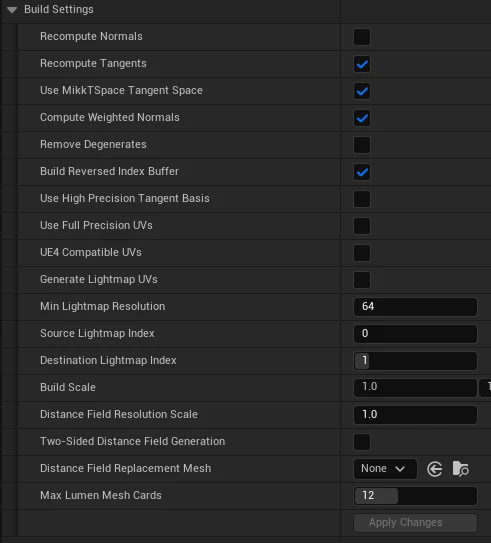

- This sets the material to Masked and enables the billboard code
- You can set those values manually on any foliage material if you would like
Make sure any opacity mask textures you use are set to “Alpha” compression
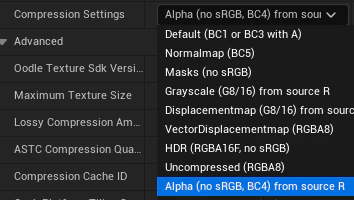
- I’ve provided a few options under /Game/Lunos/MaterialLibrary/Foliage/MasterMaterials/Textures
- You can tweak the “size” of the billboards with “QuadmeshBillboardSize”

- At a certain point (too low or too high) values start looking real weird. Remember that the scale of the initial quads is important to getting the effect right. You may need to experiment with different topology
- These should work with WPO animation stuff, but I have not tested everything.