Quickstart
-
Install “Game Tools” under get extensions in blender. Should be able to search it. (Make sure you have newest version of Blender)
-
Make your animation with morphs, geo nodes , modifiers, whatever. Animation can live in NLA tracks but doesn’t have to. As long as things move when scrubbing the timeline, it will work.
-
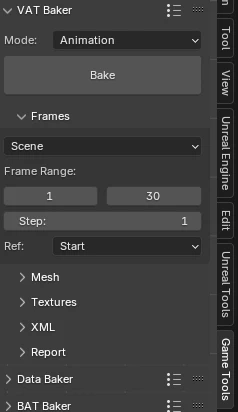
Select your mesh (or meshes! The tool will auto merge) and check out the game tools tab. Open up “VAT Baker”
-
Change the frames setting to scene if you aren’t using NLA, and manually set the frame range
-
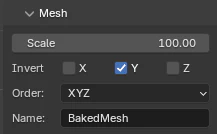
You can rename the resulting mesh under “Mesh”
-
Hit bake up at the top. In the same folder as your blender file, there should be an FBX and 2 .EXR texture files
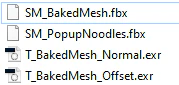
(Remember to check normals, face orientation, and remove any custom nrml data before baking)
- Import all three files into UE
- Run the plant import script

- Select “Use Animation Texture” to auto setup the anim
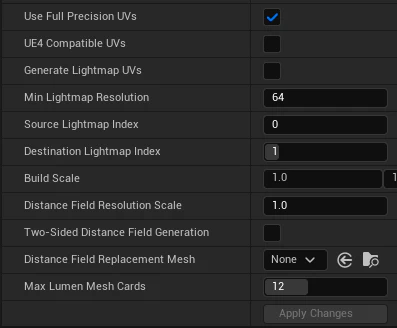
- It might look a bit funky (spiky, anim not quite right) - if that is the case, double click the static mesh and set “Use Full Precision UVs” to true, then click apply changes
- By default the anim plays as a loop. There’s an option to change it to be directly driven by an alpha that we can trigger in a BP
- I can add traditional looping in ez, or any other anim options
- Add speed control