THESE DOCS ARE IN FLUX!
Making a new 2d game level
/2DSideScroller contains all 2d game assets and code
- In
/Maps, make a new folder for your level. It should be named whatever Lunos map the 2d level is going to be played in, IEDesertorD2 - Create a new level in that folder, or copy an existing 2d game level if you want to use it as a template. Name it
MAP_NameOfLunosLevel_DescriptionOfGameplay. I’ve doingMAP_D2_Pillarfor the pillar introduction in dungeon 2. - Open
/Lunos/Maps/Test/GBGBTestMap, and add your newly created map to the levels tab. Hide any other sublevels that may be visible, and double click the newly added level to make it active. You do not need to change any loading settings.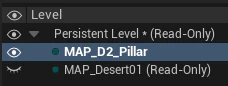
- Next you’ll need a tilemap asset for the level - this serves as the basic environment geometry.
- Easiest way is to copy an existing TM and place it in `2DSideScroller/Environment/(NameOfLunosLevel/).
- You may wish to set up a new tileset for your level, check the Tileset section. You may also use existing sets.
- Drag your newly created TM to the level, or update the existing TM to reference your new asset.
- Make sure your level contains a TM at y=50, a
BP_SideScrollerCharacterat y=0, and anBP_2d_EndOfLevelOrb
Data setup
2D games are spawned in “Lunos” game via the BP_GolemGossipStone (subject to change), which contains a 2DGameSpawnComponent. This component has a 2dGameData variable that allows the level designer to select which level loads.
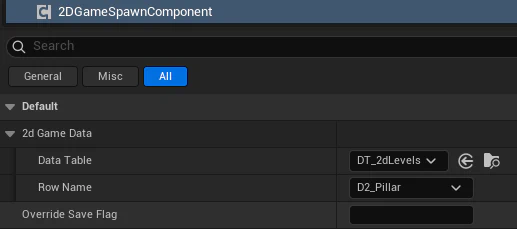
2DSideScroller/Data/DT_2dLevels, which you can quick navigate to from the datatable value in the details panel
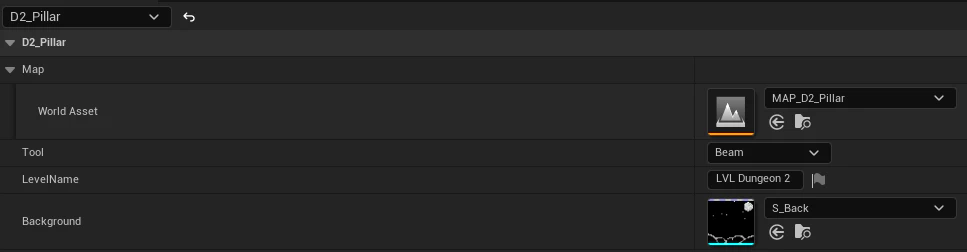
- Make a new entry with the row name of
NameOfLunosLevel_DescriptionOfGameplay(same as the map minus prefix) - Slap in a reference to your map, select which tool you want the player to load with, set the level name visible in the “hud”, and set the background sprite.
Automatically uses
2d_LunosLevel_2dLevelNameas level complete flag, which events can listen for! This is based on the rowname, so make sure it is all named accordingly! Finally, setup your2DGameSpawnComponentwithin theBP_GolemGossipStoneto use your newly created row name. This ensures the correct level will be loaded (an with the right parameters!)
2d Level tips
- Must contain a TM at y=50, a
BP_SideScrollerCharacterat y=0, and an ‘BP_2d_EndOfLevelOrb’ - Level actors are added in the viewport. You’ll need to get used to popping between the TM editor and viewport while editing. If set up correctly, their visual position will be snapped to the nearest pixel, but their gameplay position will still have FP precision. This generally shouldn’t matter, but may cause some unexpected behavior.
- 2d_OneWayPlatforms are actors, not part of the tileset. We can expand on this.
- 2d_ScanBit_Freestanding are the little “coin” actors. Can also expand on this
Terms
GBTestMap is a good place to test things / build maps
TileMap TM
Contains the environment geometry. One per 2D game level.
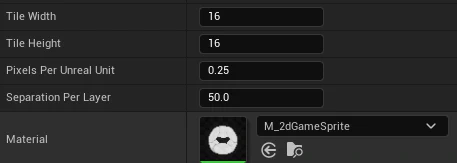
TM actor MUST be placed at y=50, and the player character at y=0. This ensures collision / layers will work correctly. Colliding actors (sprites) should live at y=0. Tilemaps reference Tilesets, which contain separation and collision data per tile. You can load as many tilesets in a tilemap as you wish, but try keep it relatively low for both memory and organizational purposes.
Tileset ‘TS’
Takes a texture input and allows you to edit collision settings per tile or groups of tiles. 2DSideScroller/Environment/TS_D2_Tileset
Tile Size MUST be 16x16! Keep collision very very simple. Remember that the player is actually a capsule and will respect ramps, but trial and error is key here.
TileSet Texture T
- Palette is established via gradient map. Aseprite has an aprox palette
- Remember to export your sprites with the “LunosExportPalette”
- BG Tiles are 16x16
- Tile sheets can be any size (keep em under 512 probably)
- Group like assets on one sheet
- Remember to set the “Tile Size” to 16x16 on the TS asset!
- No padding needed
Making a basic level actor
- Visual should be a
PaperFlipbookComponentor ‘PaperSpriteComponent’ - Must use
M_2dGameSpriteor derivative - May need to manually add collision
Music
- Music is directly tied to whatever Lunos track is playing and is NOT independent.
- Opening the 2d game simply flips an audio bool parameter
b2dGameon the music subsystem - This means every music metasound needs to be able to handle this bool
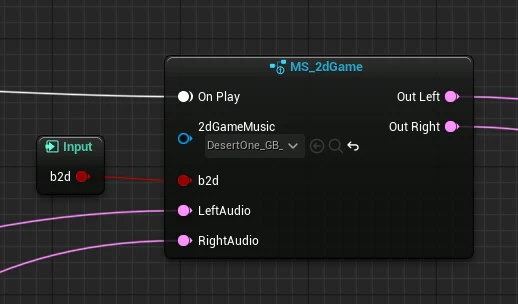
MS_2dGameis used to mix in 2d game music. Likely will be last in the chain. You can preview the music by swapping out theBP_LevelMusicPlayerin the persistent level with your new track.
- Opening the 2d game simply flips an audio bool parameter
BP_HandheldGameConsole
- Currently this lives on the MAP. Needs to not lol.
- Let’s make a component handle loading map
This does a lot that needs to be abstracted:
- Has the gameboy model
- Plays the anim going into gameboy mode
- Notably it assumes the map is already loaded, does not load anything
- Actually fires the possess command
- Tries to set the camera
- Handles “Game over” in the context of the intro
RT_2dGame contains the games render target, created by the BP_SideScrollerCharacter. Just need to display M_2dGameShader or a derivative and you are off to the races.
BP_SideScrollerCharacter
Currently:
- Runs
EnableCinematicwhich hides and freezes the player
SpawnIn
- Plays lil spawn anim / sfx
- Unfreezes the player
DisableCinematic - Initializes the music (Abstract to new system - should set a variable on LunosMusicSystem!)
- Runs
InitInput, actually gabbing input via mapping context- I think the regular PC still has input until this is called? Not sure.
I dunno if StartGame gets called? Nope
BP_2dGame_Ship
Currently:
- Waits 0.2 sec after begin play then runs
StartFlyIn- Plays a lil cinematic
- “MovePlayerToSpawn”, I guess part of the cinematic
- This does actually move the character, which moves the CAMERA. Since the player sprite is hidden the illusion works and is really easy to do, could be useful later.
- Runs
SpawnInon character.
Need to completely decouple all this.
UI_2dGame
Lives in PC, simple UMG
Gameplay issues
- Player step height continues to be an issue
- Bonking on ceiling sends the player flying
Features to add / ideas
- Breakable wall (slingshot)
- Fling shroom?
- Cannon Fruit?
- One way platforms ✓
- Maybe move it to tileset
- Pillar
- Needs a ledge it can fall off that the player can phase through by holding down
Possible scenarios
- Solidify fruit ✓
- Explore desert biome a bit
- Find pool of quicksand
- Need to shoot solidify fruit to progress
- clear jump, go across
- mission complete
- Pillars
- Explore d2
- Push pillar off ledge
- Make platform for platforming
- Desert Treasure
- Find desert cave
- Platforming (bottomless pit?)
- Find treasure room
- Treasure chest reveal
- Mission complete